Sunday, 3 January 2016

Tide Indicator Pi Project #8 - Calculation of Current Tide Completed

The program below seems to work!

Output:

('Next: ', (datetime.datetime(2016, 1, 3, 6, 18, 23, 116073), u'4.3'), ' is ', datetime.timedelta(0, 21180, 2472), ' away. /n Previous: ', (datetime.datetime(2016, 1, 2, 23, 49, 23, 115191), u'8.1'), ' was ', datetime.timedelta(0, 2159, 998410), ' ago.')
('Sum of both gaps is ', datetime.timedelta(0, 23340, 882))
('Tide is Currently: ', 'falling')
('tide difference = ', -3.8)
('lower tide value', 4.299999999999999)
('Normalised Time =', 2159, 23340, 0.29060405051843885)
0.958070971113
('Current tide : ', 7.940669690228617)


Code:


#version 1.0
#This program pulls tide data from the ports of Jersey Website
#Under a licence from the UKHO
#
#It then calculates the current tide using a simplified sinusoidal harmonic approximation
#By finding the two tide data points either side of now and working out the current tide height


import urllib2
from bs4 import BeautifulSoup
from time import sleep
import datetime as dt
import math

#open site and grab html

rawhtml = urllib2.urlopen("http://www.ports.je/Pages/tides.aspx").read(40000)
soup = BeautifulSoup(rawhtml, "html.parser")


#get the tide data (it's all in tags)

rawtidedata = soup.findAll('td')


#parse all data points (date, times, heights) to one big list
#format of the list is [day,tm,ht,tm,ht,tm,lt,tm,lt]

n=0
parsedtidedata=[]
for i in rawtidedata: 
 parsedtidedata.append(rawtidedata[n].get_text())
 n += 1

#extract each class of data (day, time , height) to a separate list (there are 10 data items for each day)

tidetimes=[]
tideheights=[]
tideday=[]
lastdayofmonth=int(parsedtidedata[-10])

for n in range(0,lastdayofmonth*10,10):

 tideday.append(parsedtidedata[n])
 tidetimes.extend([parsedtidedata[n+1],parsedtidedata[n+3],parsedtidedata[n+5],parsedtidedata[n+7]])
 tideheights.extend([parsedtidedata[n+2],parsedtidedata[n+4],parsedtidedata[n+6],parsedtidedata[n+8]])

#get time now:

currentTime = dt.datetime.now()


#create a list of all the tide times as datetime objects:

dtTideTimes=[]
tideDataList=[]

for j in range (0,lastdayofmonth*4):
 #print tidetimes[j][0:2], tidetimes[j][3:6]
 if tidetimes[j]=='**':
  dtTideTimes.append('**')
 else:

  dtTideTimes.append(dt.datetime.now().replace(day=int(j/4+1), hour=int(tidetimes[j][0:2]), minute=int(tidetimes[j][3:5])))

 #make a tuple for each data point and add it to a list
 tupleHolder =(dtTideTimes[j], tideheights[j])
 tideDataList.append(tupleHolder)
 
 #print what we've got so far
# print tideDataList[j]

#find the two closest times in the list to now:

gap1 = abs(tideDataList[0][0] - currentTime)
gap2 = abs(tideDataList[0][0] - currentTime)
nearest1 = tideDataList[0]

#print gap1 

for j in range (0,lastdayofmonth*4):

 if (tideDataList[j][0] !="**"):                      
  gapx = abs(tideDataList[j][0] - currentTime) 

#check if the data point is the first or second nearest to now. 
#Generates the datapoints either side of now

  if (gapx <= gap1):                            
   nearest1 = tideDataList[j]            
   gap1 = gapx
  if (gap1 < gapx and gapx <= gap2): 
   nearest2 = tideDataList[j]                   
   gap2 = gapx             

#print (nearest1, gap1)
#print (nearest2, gap2)
#print (gap1+gap2)    

#and now the maths begins
#print ('tide height 1 = ', nearest1[1])
#print ('tide height 2 = ', nearest2[1])

#need to get them in order of time: (this works)

if nearest1[0] > nearest2[0]:
 nextDataPoint = nearest1
 prevDataPoint = nearest2
 gapToNext = gap1
 gapToPrev = gap2

else:
 nextDataPoint = nearest2
 prevDataPoint = nearest1
 gapToNext = gap2
 gapToPrev = gap1

gapSum = gapToNext + gapToPrev

print('Next: ', nextDataPoint,' is ',gapToNext, ' away. /n Previous: ', prevDataPoint, ' was ', gapToPrev, ' ago.')
print('Sum of both gaps is ', gapSum) #this works

#is the tide rising or falling?
tideDifference = float(nextDataPoint[1])-float(prevDataPoint[1])

if (tideDifference<0 data-blogger-escaped-0="prev" data-blogger-escaped-:="" data-blogger-escaped-all="" data-blogger-escaped-code="" data-blogger-escaped-currently:="" data-blogger-escaped-currenttide="" data-blogger-escaped-data="" data-blogger-escaped-difference=", tideDifference) #this works


lowerTide = (float(nearest1[1]) + float(nearest2[1]) - abs(tideDifference))/2
print (" data-blogger-escaped-doesn="" data-blogger-escaped-else:="" data-blogger-escaped-falling="" data-blogger-escaped-for="" data-blogger-escaped-ide="" data-blogger-escaped-is="" data-blogger-escaped-lower="" data-blogger-escaped-lowertide="" data-blogger-escaped-math.cos="" data-blogger-escaped-math.pi="" data-blogger-escaped-normalisedtime="" data-blogger-escaped-ormalised="" data-blogger-escaped-pi="next" data-blogger-escaped-print="" data-blogger-escaped-scaled="" data-blogger-escaped-t="" data-blogger-escaped-this="" data-blogger-escaped-tide="" data-blogger-escaped-tidedifference="" data-blogger-escaped-tidestate="" data-blogger-escaped-time=", gapToPrev.seconds, gapSum.seconds, normalisedTime)

print (math.cos(normalisedTime))

if tideState == " data-blogger-escaped-to="" data-blogger-escaped-urrent="" data-blogger-escaped-value="" data-blogger-escaped-work="" data-blogger-escaped-works="">

Saturday, 2 January 2016

Tide Indicator Pi Project #7 - Finding the two tide data points nearest to the current time.

This project is taking ages! I've done a lot since the last post however, but documented very little, so I'll do my best to recall how I got from there to here. You can see all the posts so far here.

The problem in a nutshell: The program needs to get the two tide data points either side of the current time, to work out what the tide is doing now.

Since the last post, the code has been modified to create a list of tuples, with each tuple having two data points (tide time, tide height)

It then works out the gap between each data point and the current time, and tries to store the two nearest times as 'nearest1' and 'nearest2'. Sometime it works:

Time Now:
2015-01-02 16:33

Output:
(datetime.datetime(2016, 1, 2, 17, 52, 40, 854958), u'4.0'),
(datetime.datetime(2016, 1, 2, 11, 9, 40, 854071), u'8.4')

Sometimes it doesn't and misses a point.


#
import urllib2
from bs4 import BeautifulSoup
from time import sleep
import datetime as dt


#open site and grab html

rawhtml = urllib2.urlopen("http://www.ports.je/Pages/tides.aspx").read(40000)
soup = BeautifulSoup(rawhtml, "html.parser")


#get the tide data (it's all in tags)

rawtidedata = soup.findAll('td')


#parse all data points (date, times, heights) to one big list
#format of the list is [day,tm,ht,tm,ht,tm,lt,tm,lt]

n=0
parsedtidedata=[]
for i in rawtidedata: 
 parsedtidedata.append(rawtidedata[n].get_text())
 n += 1

#extract each class of data (day, time , height) to a separate list (there are 10 data items for each day):

tidetimes=[]
tideheights=[]
tideday=[]
lastdayofmonth=int(parsedtidedata[-10])

for n in range(0,lastdayofmonth*10,10):

 tideday.append(parsedtidedata[n])
 tidetimes.extend([parsedtidedata[n+1],parsedtidedata[n+3],parsedtidedata[n+5],parsedtidedata[n+7]])
 tideheights.extend([parsedtidedata[n+2],parsedtidedata[n+4],parsedtidedata[n+6],parsedtidedata[n+8]])

#get time now:

currentTime = dt.datetime.now()


#create a list of all the tide times as datetime objects:

dtTideTimes=[]
tideDataList=[]

for j in range (0,lastdayofmonth*4):
 #print tidetimes[j][0:2], tidetimes[j][3:6]
 if tidetimes[j]=='**':
  dtTideTimes.append('**')
 else:
  dtTideTimes.append(dt.datetime.now().replace(day=int(j/4+1), hour=int(tidetimes[j][0:2]), minute=int(tidetimes[j][3:5])))


#create a tuple of time and height, and add each tuple to a list


 tupleHolder =(dtTideTimes[j], tideheights[j])
 tideDataList.append(tupleHolder)


#print what we've got so far


for j in range (0,lastdayofmonth*4):
 print tideDataList[j]

#find the two closest data points to now in the list:

gap1 = abs(tideDataList[0][0] - currentTime)
nearest1 = tideDataList[0]
print gap1 

for j in range (0,lastdayofmonth*4):


 if (tideDataList[j][0] !="**"):


  gap2 = abs(tideDataList[j][0] - currentTime)
  print tideDataList[j][0], gap2, nearest1


  if (gap2 < gap1):


   nearest2 = nearest1
   nearest1 = tideDataList[j]
   gap1 = gap2

print (nearest1, nearest2)
    
#this nearly works!!! Gave the two nearest high tides, not nearest high and low.

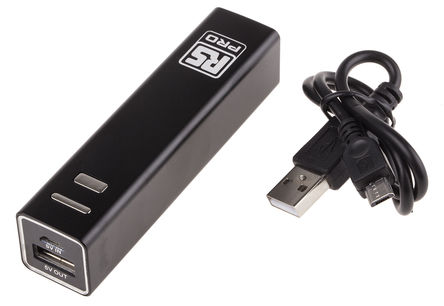
Portable Power

http://uk.rs-online.com/web/p/lithium-rechargeable-battery-packs/7757504/

Powers a Raspberry Pi with 5V for £8 from RS

Thursday, 31 December 2015

Home Heating IoT Project - MQTT? Node.js? Both? - Initial Thoughts

This is the plan:


In my house, I have 4 Redwell heaters in upstairs rooms. They were installed inexpertly (not by me) with the receiver/relay units downstairs, so the room thermostat's RF send signal is not always picked up. This results in heaters staying on all day sometimes.

An IoT solution would solve this problem as well as giving me a host of other useful features. Most desirable:


  • Programmable on/off times (very desirable option: with thermostat control)
  • Manual on/off override of timing program.
  • All on / all off override for if we are out on an evening.
  • Webpage interface.
  • Internet access from outside the home.
From what I have read so far, it looks like MQTT could be very useful, as could node.js. (see also here)

First step is to build a mini-mock-up. On current form this will take months!


Monday, 21 December 2015

MQTT - Mosquitto - To control IoT stuff

I'm coming to realise that MQTT is probably the tool I need to get my head around for basic home automation / monitoring.

On reading up a bit here:


I saw a link to Andy Standford-Clarks ' House that Twitters':


with the audio from the talk at oggcamp here:
http://stanford-clark.com/andysc_oggcamp.mp3


 Less Technical talk by ASC:


Things I want to check out further:
Easyradio
X10 appliance control signalling via mains cables: http://www.x10.com/

Also useful:
http://oliversmith.io/technology/2010/02/26/mqtt-mosquitto-and-php/
(And lots of other stuff from @chemicaloliver )

Idea: AIS - Ship-plotter - Condor??

Further research needed: Websockets.


Monday, 14 December 2015

Wearable Tech - Daughter's Christmas Jumper


Daughter #1 needed to jazz up her Christmas jumper for school. We had a cheap set of 50 blue LED lights with 3xAA battery pack attached, and she was going to use them as they were.

Itching to use my Arduino Nano I'd acquired a couple of months previously, I suggested an upgrade!

Fastening the lights to the jumper was the hardest bit.


I used this code to program the lights:


// Dim an LED using a PWM pin
int PWMpin = 10; // LED in series with 470 ohm resistor on pin 10

void setup()
{
  // no setup needed
}

void loop()
{
   for (int i=0; i <= 255; i++){
      analogWrite(PWMpin, i);
      delay(15);
   }

   for (int i=0; i <= 3; i++){
     analogWrite(PWMpin, 255);
     delay(500);
     analogWrite(PWMpin, 0);
     delay(500);
   }
   for (int i=0; i <= 10; i++){
     analogWrite(PWMpin, 255);
     delay(100);
     analogWrite(PWMpin, 0);
     delay(100);
   }


   for (int i=0; i <= 255; i++){
      analogWrite(PWMpin, 0-i);
      delay(15);
   } 
}


Tuesday, 1 December 2015

Arduino Autonomous Boat

This is what I built for the 2015  Jersey Tech Fair:


When discussing the Tech Fair, and the probability of there being a large pool for the open ROV (link), my colleague, Max, suggested some surface craft, to make further use of the pool. Intrigued, I volunteered to make one too, thinking it would be a relatively simple thing to do with a Raspberry Pi.

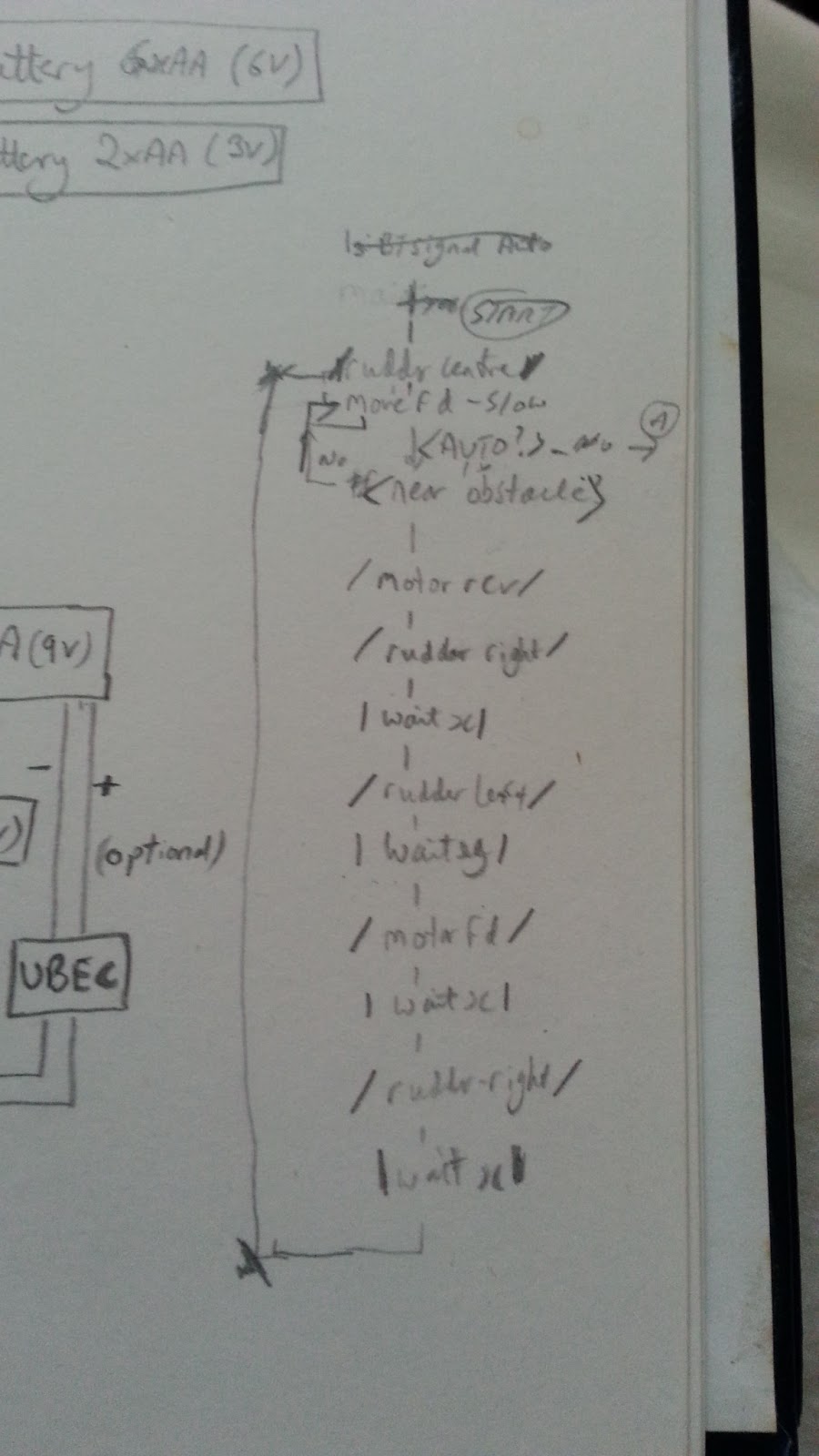
Instead it turned into a great learning experience with the Arduino platform. I LOVE the Arduino now, almost as much as the Pi! I was looking for an excuse to try programming the Arduino with Flowol, which I use in schools with children for my day-job . This proved the perfect project.


Build Stage 1:

Planning:

Build Stage 2:


Completed Build: 


Having used Flowol extensively in schools with children, and knowing it could program the Arduino, it seemed a quick win to use it for this project. I could refresh my 'C' language skills another time.


Failures:

Bluetooth Remote Control - could not get this to work. Still haven't. Tried various bits of code and apps.

Camera Module - just ran out of time to make it a 'glass-bottomed boat' with a Pi and camera module included. Mark 2 will have!

Design:

Air propulsion was decided upon early. Initially we'd discussed using battery powered pocket cooling fans. In the end we went for motors with propellers attached. All three boats use different steering mechanisms. Mine uses a traditional rudder. Max went for a pair of motors on one model and a pivoting motor on the second.

Materials:

I used expanded polystyrene wrapped in black duct tape. Max went for Kingspan insulation, which I would go for next time. It's stiffer, easier to source, and nicer to work with and shape. The electronics are in modular form with each section in a business card box, to try and keep it dry. The motors and prop were from a school DT cupboard. I ordered the battery pack online.

Problems:

Biggest problem - noise on the ultrasonic sensors, caused by either the motor or the servo. I partially solved it by averaging three readings. Still too erratic though.

I recorded this while I investigated the noise problem with an oscilloscope at work.


The other main problem, which was actually of little import in the end, was that after the first test in Coronation Park, I must have damaged my Arduino board, as I could no longer connect to reprogram it. However, it ran the existing program perfectly, and since it worked, there was no real need to change it. I turned the prop round to a 'pull' rather than a push, but I just swapped the wires so no reprogramming was necessary.